



How to Clean the Feed Dogs & Shuttle Area (Front‑Load Bobbins)Updated 6 months ago
Regular cleaning helps your machine run smoothly and prevents skipped stitches, thread jams, and noise. Follow the steps below to safely clean the feed dogs and shuttle area.
Before you begin:
Turn off your machine and unplug it from the electrical outlet.
. Prepare the Machine
- Turn the handwheel toward you to raise the needle to its highest position.
- Some models have an alignment mark on the handwheel—if yours does, line it up.
- Remove the free arm accessory bed.
- Open the bobbin case access door.
- Remove the bobbin case.
2. Remove the Shuttle Race Cover & Shuttle
Once the bobbin case is out, you’ll see the shuttle area.
Pro Tip:
It may be easier to clean if you gently tip the machine backward or lay it on its back for better visibility.
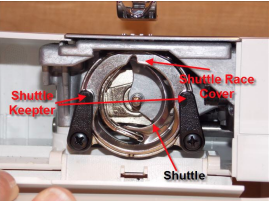
- Push the two shuttle keepers outward.
- Remove the Shuttle Race Cover.
- Lift out the Shuttle (the half‑moon–shaped piece) and set both parts aside.
3. Clean & Oil the Area
- Use a lint brush to clean:
- Feed dogs
- Shuttle area
- Surrounding surfaces
- Use a pair of tweezers to remove any stuck thread
- Add one drop of sewing machine oil to:
- The center pin of the shuttle
- The hook area inside the machine
4. Reinstall the Shuttle
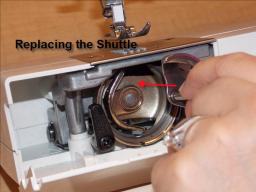
- Make sure the needle is still at the highest position.
- Hold the shuttle by its center pin and place it back so it forms a half‑moon on the right side.
5. Reinstall the Shuttle Race Cover
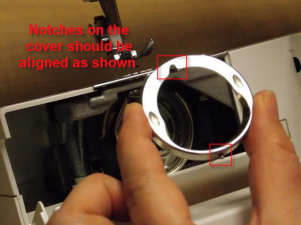
- Hold the cover so the notches align with the pins.
- Slide the cover into place.
- Move the shuttle keepers back over the cover to lock it in securely.
6. Reinsert the Bobbin Case
- Align the finger on the bobbin case with the notch on the shuttle race cover.
- Push in until you hear or feel a click.